MTE Relay Server on Azure
Introduction
MTE Relay Server is an end-to-end encryption system that protects all network requests with next-generation application data security. It acts as a proxy server in front of your backend, communicating with an MTE Relay Client to encode and decode all network traffic. The server is highly customizable and supports integration with other services through custom adapters.
Below is a typical architecture where a client application communicates with an MTE Relay Server, which then proxies decoded traffic to backend services:
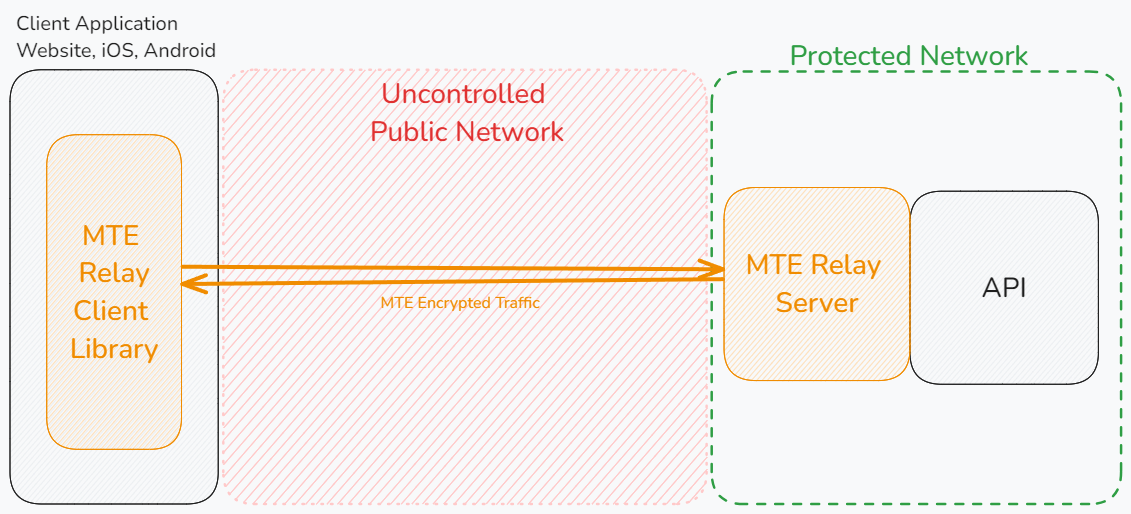
MTE Relay Servers can only communicate with MTE Relay Clients. An MTE API Relay cannot communicate with an MTE Relay Server or an MTE Relay Client SDK. MTE Relay Servers are strictly for client-to-server communications.
Prerequisites
Technical Requirements
- A web or mobile application project that communicates with a backend API over HTTP.
- Our demo app is available on GitHub: MTE Relay Demos.
Skills and Knowledge
- Familiarity with AKS and Kubernetes.
- Ability to manage deployments with
kubectl.
Deployment Options
MTE Relay Server is provided as a Docker image and is typically run on Azure Kubernetes Service (AKS).
Azure Kubernetes Service (AKS)
Assuming kubectl is configured for your AKS cluster:
Example Deployment (deployment.yaml)
apiVersion: apps/v1
kind: Deployment
metadata:
  name: azure-mte-relay-deployment
spec:
  replicas: 1
  selector:
    matchLabels:
      app: azure-mte-relay
  template:
    metadata:
      labels:
        app: azure-mte-relay
    spec:
      containers:
        - name: azure-mte-relay
          image: <CONTAINER_IMAGE>
          ports:
            - containerPort: 8080
          env:
            - name: DOMAIN_MAP
              value: '{ "relay.example.com": { "upstream": "<UPSTREAM_VALUE_HERE>", "client_id_secret": "<YOUR_CLIENT_ID_SECRET_HERE>", "cors_origins": ["<YOUR_CORS_ORIGINS_HERE>"] } }' # Update this value!
Deploy:
kubectl apply -f deployment.yaml
Example Service (service.yaml)
Expose the deployment via a load balancer:
apiVersion: v1
kind: Service
metadata:
  name: azure-mte-relay-service
spec:
  type: LoadBalancer
  selector:
    app: azure-mte-relay
  ports:
    - protocol: TCP
      port: 80
      targetPort: 8080
Deploy:
kubectl apply -f service.yaml
kubectl get services
Remove Deployment and Service
kubectl delete -f deployment.yaml
kubectl delete -f service.yaml
Server Configuration
MTE Relay Server is configured using environment variables.
Using a DOMAIN_MAP (Recommended)
Use the DOMAIN_MAP Builder tool to configure your domains visually, validate your settings, and copy a ready-to-use DOMAIN_MAP value — no manual JSON editing required.
DOMAIN_MAP is a JSON object keyed by the Host header that arrives with each request.
The value for each key is a settings object that tells the proxy how to process the request.
Settings
| Field | Type | Purpose |
|---|---|---|
| upstream | string | Full URL (http://localhost:8080, https://api.internal) |
| pass_through_routes | string[] | Paths that use standard HTTP proxy, without MTE encryption |
| client_id_secret | string | Legacy shared secret used by some auth layers |
| cors_origins | string[] | List of allowed CORS origins for preflight requests |
| cors_methods | string[] | List of allowed CORS methods for preflight requests |
| headers | string | A JSON object of additional headers to add to proxied requests |
Examples
- Single Proxy: Requests with Host header
mte-api.company.comare decrypted and forwarded tohttp://internal-service. The/healthroute is proxied without MTE encoding/decoding.
{
  "mte-api.company.com": {
    "upstream": "http://internal-service",
    "client_id_secret": "8KeJmtuKweUhymNJmGHvGMrJCUtHxhQG",
    "pass_through_routes": ["/health"],
    "cors_origins": ["https://app.company.com"]
  }
}
- Multi-service proxy that handles:
- Incoming encoded requests for
billing.company.io, forwarding tohttp://billing-servicewith/readyand/liveroutes unencoded. - Request to
auth.company.io, forwarding tohttp://auth-servicewith/healthroute unencoded. - All other requests (any Host) are proxied to
http://default-backend:8080without encoding.
{
  "billing.company.io": {
    "upstream": "http://billing-service",
    "pass_through_routes": ["/ready", "/live"],
    "client_id_secret": "8KeJmtuKweUhymNJmGHvGMrJCUtHxhQG",
    "cors_origins": ["https://app.company.com"]
  },
  "auth.company.io": {
    "upstream": "http://auth-service:3000",
    "pass_through_routes": ["/health"],
    "client_id_secret": "heYBRbTr3QNBgQFV6x6YpfWqyEs2Tj8F",
    "cors_origins": ["https://app.company.com"],
    "cors_methods": ["GET", "POST", "OPTIONS"]
  },
  "*": {
    "upstream": "http://default-backend:8080",
    "client_id_secret": "PmNPtWJMzz46S9k8cY7du5Z6XYc9B5Ad",
    "cors_origins": ["https://app.company.com", "http://localhost:3000"]
  }
}
Export as one-line env var:
export DOMAIN_MAP='{ "billing.company.io": { "upstream": "http://billing-service", "pass_through_routes": ["/ready", "/live"], "client_id_secret": "8KeJmtuKweUhymNJmGHvGMrJCUtHxhQG" }, "auth.company.io": { "upstream": "http://auth-service", "pass_through_routes": ["/health"], "client_id_secret": "heYBRbTr3QNBgQFV6x6YpfWqyEs2Tj8F" }, "*": { "upstream": "http://default-backend:8080", "client_id_secret": "PmNPtWJMzz46S9k8cY7du5Z6XYc9B5Ad" } }'
Host header derivation
The Host header is taken directly from the authority component of the absolute URL used in the request.
For example, https://api.example.com/users/1 the authority is api.example.com (port 443 is implicit for HTTPS), so the Host header sent by the client is exactly:
Host: api.example.com
If the URL contains an explicit port (https://api.example.com:8443/users/1) the header becomes:
Host: api.example.com:8443
DOMAIN_MAP must therefore use the exact same string—domain only, or domain:port—to match the incoming Host header. Or, use a wildcard "*" to match any host.
Host Matching
MTE Relay Server performs an exact match against the Host header (case-insensitive).
If an exact match is not found, it checks for a wildcard ("*").
If no match is found, the request is rejected with 404.
Using individual Environment Variables (Legacy)
Using these environment variables will result in the MTE Relay Server being configured to only handle a single domain. This method is deprecated in favor of using the DOMAIN_MAP variable. If both are provided, DOMAIN_MAP will take precedence.
Example:
UPSTREAM- Upstream API or service URL.CLIENT_ID_SECRET- Secret for signing client IDs (minimum 32 characters).PASS_THROUGH_ROUTES- Comma-separated list of routes proxied without encoding/decoding.CORS_ORIGINS- Comma-separated list of allowed origins.CORS_METHODS- Comma-separated list of allowed methods. Default:GET, POST, PUT, DELETE.
UPSTREAM='https://api.my-company.com'
CLIENT_ID_SECRET='2DkV4DDabehO8cifDktdF9elKJL0CKrk'
PASS_THROUGH_ROUTES='/health,/version'
OUTBOUND_TOKEN='s3cr3tT0k3nV4lu3'
Additional Environment Variables
PORT- Default:8080.LOG_LEVEL- One of trace, debug, info, warning, error, panic, disabled. Default:info.
Client-Side Setup
Eclypses provides client-side SDKs to integrate with MTE Relay Server:
Client-side integration typically requires less than one day of effort.
Testing & Health Checks
- Monitor container logs for startup messages
- Use the default or custom echo routes to test container responsiveness:
- Default:
/api/mte-echo - Custom Message:
/api/mte-echo?msg=test
- Default:
Expected response:
{
  "message": "test",
  "timestamp": "<timestamp>"
}
Monitoring
Azure Monitor and Grafana
- Enable Azure Monitor to track cluster CPU, memory, and network usage.
- Optionally enable Azure Managed Grafana for advanced dashboards.
Azure Monitor Documentation
Azure Managed Grafana Documentation
Grafana Dashboard Configuration
Import the provided Grafana dashboard:
Download Grafana Dashboard
Dashboard Metrics:
- Requests Processed [req/sec]
- Request Time [ms]
- Upstream Proxy Time [ms]
- Average Decode Time [ms]
- Average Encode Time [ms]
Performance Metrics
Performance was measured with ~1 kb request/response payloads:
| Concurrency | Req/Sec Relay | Req/Sec API | Relay % | Extra Latency (Median) |
|---|---|---|---|---|
| 400 | 185 | 188 | 98.5% | +10 ms |
| 500 | 298 | 305 | 97.8% | +17 ms |
| 550 | 338 | 355 | 95.1% | +45 ms |
| 600 | 339 | 402 | 84.3% | +202 ms |
Note: At higher volumes (≥550 concurrent), scale using multiple Relay pods and Azure load balancing.
Troubleshooting
- Invalid Configuration
- Check logs for missing/invalid environment variables.
- Relay unreachable
- Verify AKS service and NSG rules.
- Redis connection issues
- Ensure Redis is reachable with valid credentials.
Security
Container Hardening
MTE Relay Server is built and hardened using the following practices:
- Minimal base image — The runtime image uses Google's
Distroless
cc-debian12base. It contains only the application and its runtime dependencies — no shell, no package manager, and no general-purpose OS utilities — which dramatically reduces the attack surface. - Multi-stage build — The application is compiled in a separate
golangbuild stage. Build tooling and source never ship in the final image; only the compiled binary is copied forward. - Non-root runtime — The container runs as a dedicated unprivileged
user (
nonroot). No root privileges are required at runtime. - Minimal surface — Only port
8080is exposed, and the image runs a single binary entrypoint. - No persisted secrets — No sensitive data is stored in the container; all configuration is supplied at runtime via environment variables.
Vulnerability Scanning
Container images are scanned for known vulnerabilities with Docker Scout prior to publication to the Azure Marketplace. Scan reports for the current image tag are available from Eclypses Support on request (see Support).
Customers can also generate their own native scan evidence within Azure by enabling Microsoft Defender for Containers and Azure Container Registry vulnerability scanning on the image they pull and run in AKS. This produces Microsoft Defender for Cloud findings directly within your own Azure subscription.
Maintenance
Release Cadence
Updated container images are published on an as-needed basis — when new
features, dependency updates, or fixes warrant a release. Security patches
are issued out-of-band as needed and are not tied to a fixed calendar
cadence. Each release is versioned (see the image tag, e.g. 4.6.7) and
distributed through the Azure Marketplace.
Patch SLA
Eclypses' commitment for security patches:
- Critical vulnerabilities are addressed in a patched image within 30 days of confirmed disclosure.
- Lower-severity issues are addressed in a subsequent release.
To receive an updated image, pull the latest tag and update your AKS deployment manifest to reference it.
Fault Recovery
- Restart the Relay container pod; clients will re-pair automatically.
Support
MTE Relay Server is a commercially supported product from Eclypses.
Support and security-patch SLAs (including the 30-day critical-patch
commitment described under Maintenance) are provided to
licensed/subscribed customers. For escalations, scan reports, or hardening
documentation, contact Eclypses Support:
📧 customer_support@eclypses.com
🕒 Monday–Friday, 8:00 AM–5:00 PM MST (excluding holidays)